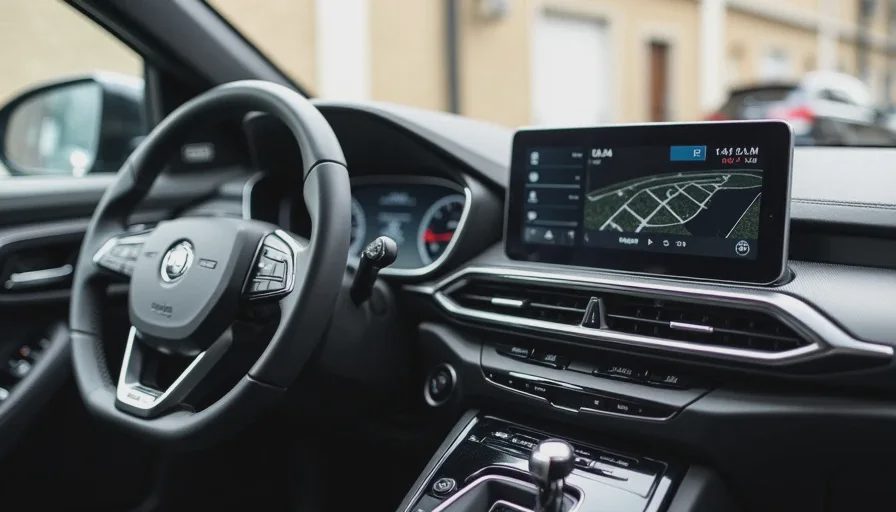
The Setup
Vehicle: Denza D9 (2024 model year, Premium trim)
Cockpit SoC: Qualcomm Snapdragon 8155 (SA8155P)
RAM / Storage: 8 GB / 128 GB
Display: 15.6‑inch centre touchscreen, claimed 60 Hz refresh rate
OS Version: Based on Android Automotive 12, with BYD‑customised UI (version number:
V1.3.2_20250315, buildDI3.0_CN_2025Q1)Ambient Conditions: 22°C garage, no direct sunlight, vehicle on accessory power
All observations are from stationary tests – I haven't yet measured under driving vibration, but the issue is apparent even at a standstill.
The Observed Issue
Under light load (home screen, static maps, media playback), the screen is perfectly smooth – no complaints.
But under a moderate daily‑use load – the kind you'd have on a 30‑minute highway commute – the refresh rate clearly drops. I'm seeing:
Navigation active (3D map, live traffic, route guidance)
Music streaming (Bluetooth AAC, background)
Climate panel open (fan speed adjusted once)
One‑step app switching (nav → music → climate → nav repeatedly)
In this scenario, the animation of map panning becomes visibly stuttery – not unresponsive, but with micro‑jitters that suggest the frame rate is dipping well below 60 fps. The system settings still report "60 Hz" in the display options, but the real‑world experience contradicts that.
I've also noticed that after ~15 minutes of this load, the centre screen's upper edge becomes noticeably warm to the touch – not alarming, but consistent with thermal throttling of the GPU. The SoC is the same 8155 we've seen in many other vehicles, but the cooling solution here seems less aggressive than, say, in a NIO ET5.
So the core question is: Is this a genuine drop in refresh rate, or just a perceived stutter due to frame‑time inconsistency? And more importantly – how do I measure it objectively?
What I've Tried So Far (and Why It's Inconclusive)
1. Developer Options – "Show Refresh Rate" (Android built‑in)
This overlay typically displays the refresh rate in Hz. On my D9, it consistently shows 60 Hz, even during the stuttery moments. That suggests the display panel itself is not switching to a lower refresh mode – the panel is running at 60 Hz, but the frames delivered by the GPU are not keeping up.
Conclusion: This measures panel refresh, not actual frame delivery.
2. Developer Options – "GPU Render Profiling" (bars)
I enabled the on‑screen bars that show frame rendering time. The graph shows occasional spikes above the 16.7 ms (60 Hz) line – indicating dropped frames. But the visualisation is small, hard to quantify, and doesn't give me a continuous average over time.
Conclusion: It confirms frame drops, but not a reliable metric for comparison across vehicles.
3. Sideloaded Apps – "CPU Monitor" and "FPS Meter"
I tried a few Android apps that claim to show real‑time FPS (e.g., GameBench, DevCheck). Most require root or ADB permissions, and some crashed on the Automotive OS. The one that worked (DevCheck) reported GPU utilisation rather than rendered frame rate – it showed GPU load around 80–90% during the stutter, which is high, but still not a direct FPS number.
Conclusion: No reliable, non‑invasive FPS tool found for this OS.
4. Visual Inspection with a High‑Speed Camera (iPhone 240 fps)
I recorded the screen while a UI element (a rotating map compass) was moving. I counted frames between positions – but the movement wasn't perfectly linear, and the angular velocity was hard to standardise. The measured frame rate varied between 45 and 55 fps depending on the segment.
Conclusion: Too much error margin; not repeatable.
5. Temperature Correlation
I measured surface temperature with an IR thermometer at the top edge of the screen. After 30 minutes of load, it reached 63°C. The stutter became more frequent as temperature rose. This strongly hints at thermal throttling, but it's circumstantial – I need direct FPS data to confirm.
What I Need from the Community
I'm looking for a standardised, repeatable test methodology that anyone can run on any Android Automotive cockpit, without root, without expensive equipment, and with results that can be compared across models.
Specifically:
What's the most reliable method to measure actual rendered frame rate (not panel refresh) on a locked‑down Android Automotive system?
Is there an ADB command that polls the SurfaceFlinger stats and outputs average FPS over a time window?
Are there any trusted APKs that can run in the background without root and log FPS to a file?
Can I enable
systraceorperfettowithout special privileges?
What's the "gold standard" stress scenario – a short (e.g., 5‑minute) sequence that maximises GPU load and produces consistent results across vehicles? I'm thinking:
Open navigation with 3D buildings and traffic
Open split‑screen (if supported) or overlay another app
Swipe between home screens rapidly (but that's subjective)
How do I account for thermal variables? Should I run the test at a fixed ambient temperature (e.g., 25°C) for 30 minutes and record FPS every 5 minutes? Or is a shorter burst test more meaningful?
Has anyone already done this on a Denza D9 or a similar BYD‑based cockpit? If so, what FPS numbers did you get under load? I'd love to see if my unit is an outlier or this is a widespread limitation.
My Proposed Test Plan (Draft)
To move forward, I'm thinking of this protocol – but I want your feedback before I invest time in it:
Pre‑condition: Vehicle at 22°C ambient, no direct sunlight, windows closed, accessory power. Allow system to idle for 5 minutes.
Load scenario:
Open native navigation, set a 30‑minute route.
Open music app (Bluetooth source active but not playing to avoid audio overhead – or should I play?).
Open climate panel, set to 22°C, fan speed 3.
Use the "recent apps" button to switch between these three apps in a fixed cycle (navigation → music → climate → navigation), waiting 3 seconds on each screen, repeating for 10 cycles.
Measurement:
Use ADB command
adb shell dumpsys gfxinfo <package>after each cycle to get frame stats (jank, missed vsync, etc.). This gives me an aggregate over the run.Also log CPU/GPU frequency and temperature via
adb shell cat /sys/class/thermal/thermal_zone*/tempif accessible.
Repeat: Run the test twice with a 10‑minute cooldown between runs.
But I'm not sure if the gfxinfo output is reliable for Automotive OS, or if the package names are known.
Your Turn – What's the Right Way?
I'm posting this not as a rant, but as a genuine request for methodology. I'm willing to put in the work – I just need to know which tools to use and how to standardise the test.
If you've measured refresh rate or frame‑drop on your own vehicle – whether it's a Denza, a NIO, a Li Auto, or a Tesla – please share:
What tool/app/command you used
Your exact test scenario (so I can replicate)
Your results (average FPS, jank count, thermal data if any)
Any pitfalls or gotchas you discovered
If we can agree on a community‑standardised "Cockpit Frame‑Rate Stress Test", we'll be able to compare apples to apples across brands and chipsets. That would be a huge asset for the Hardware Bench.


No letters yet — be the first guest to write.